Binding Flurry Analytics with Xamarin.iOS

This week, I needed to use Flurry Analytics in my Xamarin.iOS and my Xamarin.Android apps, but there was no .NET SDK for these platforms. Flurry did provide a SDK for each platform, but it was the native libraries, which cannot be used directly in .NET. Given this, I decided to bind those native libraries using Xamarin.iOS and Xamarin.Android.

I have split this project up into four parts:

  1. Introduction and Pre-requisites
  2. Xamarin.iOS binding
  3. Xamarin.Android binding
  4. Flurry.Analytics in the wild

The first thing we are going to bind is the iOS SDK for Flurry Analytics. This task needs two things from the downloaded SDK:

  • [iOS-sdk-path]/Flurry-iOS-5.2.0/Flurry/Flurry.h
  • [OS-sdk-path]/Flurry-iOS-5.2.0/Flurry/libFlurry_5.2.0.a

Of course, the version numbers may change for later releases. The header file (.h) is going to be used to generate the .NET interfaces and enums. The library (.a) is going to be used in the project.

Just before we do the cool things, we should just create our C# solution for the Xamarin.iOS binding. Just create a new project/solution and select the “iOS Binding Project” template. For my project name I used Flurry.Analytics.iOS, but you could use anything.

The default project has a few files in it, we will have a look at each one in depth as we go through the binding steps:

  • ApiDefinition.cs (this is for the generated .NET interfaces from Objective Sharpie)
  • AssemblyInfo.cs (the usual assembly information attributes)
  • Extras.cs (this is for any additional changes that are needed for the bound types)
  • StructsAndEnums.cs (this is for any extra types that you wish to include in the final assembly)

Creating the Initial Binding

This step will involve using Objective Sharpie to get us started, but we will almost always have to go in and tweak a few things.

So, first things first, open Objective Sharpie and start the wizard. Select the Flurry.h header file, and I used the namespace Flurry.Analytics. After saving your file somewhere, we can start the tweaks. I don’t save the result into my solution as the amount of tweaks needed is high enough that I like to have a before and after file. Also, this library is very small. But, there is no reason why you couldn’t just save over the ApiDefinition.cs file in you project.

Before we start, here is a snippet from the Flurry.h file:

    // an enum
    typedef enum {
        FlurryLogLevelNone = 0,
        FlurryLogLevelCriticalOnly,
        FlurryLogLevelDebug,
        FlurryLogLevelAll
    } FlurryLogLevel;

    // the main class
    @interface Flurry : NSObject {
    }
    // ...
    + (void)setAppVersion:(NSString *)version;
    + (NSString *)getFlurryAgentVersion;
    + (void)startSession:(NSString *)apiKey;
    // ...
    @end

In this snippet of Objective-C goodness, there is an enum named FlurryLogLevel and an @interface named Flurry. This will translate into a C# enum and class respectively. It is also good to note that all the methods on this particular type will be static.

The generated C# for this snippet is:

    // the enum
    public enum FlurryLogLevel : [unmapped: unexposed: Elaborated] {
        None = 0,
        CriticalOnly,
        Debug,
        All
    }

    // the main class
    [BaseType (typeof (NSObject))]
    public partial interface Flurry {
        // ...
        [Static, Export ("appVersion")]
        [Verify ("ObjC method massaged into setter property", "Flurry/Flurry.h", Line = 61)]
        string AppVersion { set; }

        [Static, Export ("getFlurryAgentVersion")]
        [Verify ("ObjC method massaged into getter property", "Flurry/Flurry.h", Line = 80)]
        string GetFlurryAgentVersion { get; }

        [Static, Export ("startSession:")]
        void StartSession (string apiKey);
        // ...
    }

As you can see, the generated file is similar, but not quite the same.

Tweaking the Generated Binding (ApiDefinition.cs)

After we generated our C# files, there are several things to note:

  • This code doesn’t compile at all
  • A good few of our methods are set to properties, especially note the setter-only ones
  • There is a [Verify(...)] attribute which doesn’t even exist
  • Some [Export] attributes have a value that ends in a colon (:), and others do not
  • The type is not a class but an interface
  • The base type is specified as a [BaseType] attribute
  • The enum has the item prefixes removed

This is quite a list here, but not all are bad. Objective Sharpie can’t generate perfect code as Objective-C is not C#, so there will always be human intervention. In these cases, it will generate what it thinks to be best and then let you know.

The [Verify] attribute is one way that Objective Sharpie lets you know that it changed something. In this instance, it is letting us know that it changed the setAppVersion method into a property. This is because usually there is both a getter and a setter method for a Objective-C property. But in this case, it is actually a method.

As you may note, these properties have a slightly different [Export] attribute in that these members don’t end in a colon. This is valid for Objective-C property setters, but as this is a method, we should add a colon back. It is also valid for methods that take parameters.

So, to fix those properties, remove the [Verify] attribute. We should also fix the exported name, and for the setter property, add the colon back in.

    [BaseType (typeof (NSObject), Name = "Flurry")]
    public partial interface FlurryAgent {

        [Static, Export ("setAppVersion:")]
        void SetAppVersion (string version);

        [Static, Export ("getFlurryAgentVersion")]
        string GetFlurryAgentVersion ();

        [Static, Export ("startSession:")]
        void StartSession (string apiKey);

    }

As you can see here, I corrected the SetAppVersion write-only property by transforming it into a void method that exports to setAppVersion:. Note the full name and colon as this method takes a parameter.

Also, I needed to fix the GetFlurryAgentVersion read-only property by transforming it into a string method that exports to “getFlurryAgentVersion”. Note the lack of colon as this method takes no parameters.

And finally, I decided I wanted my final class to be called FlurryAgent to avoid confusion with the namespace as well as indicate that it was the Agent. In order to do this, All I needed to do was to rename the type and add the Name property in the attribute with a value of "Flurry".

The reason for adding this property is, after changing the type name, the binding no longer will be able to find the underlying Objective-C type. Usually the binding will use the default name if none is provided, the C# class name. After changing it, it no longer reflected the Objective-C type name, hence the new property.

Managing the Structures and Enumerations (StructsAndEnums.cs)

The last thing to fix, in the generated code, is the enum.

This is simple to do, just remove the strange attribute-like bit: [unmapped: unexposed: Elaborated].

One of the nice things of Objective Sharpie is that it removes the enum prefixes and just uses the relevant bits. For example the original item was FlurryLogLevelNone, but this is now just None.

The final enum looks like this after it has been moved to StructsAndEnums.cs:

    public enum FlurryLogLevel {
        None = 0,
        CriticalOnly,
        Debug,
        All
    }

So far, all our generated code has been moved into either, ApiDefinitions.cs (the class), or StructsAndEnums.cs (the enum). We are still not complete yet, but we are nearly there.

Additional Binding Code (Extras.cs)

Once we have the basic binding done, we can always extend what the native library provided with extra features. This is done by adding new source files to the project.

For example, if for some reason you need to add any extra bindings to the library, say to access a private member or even just to make the new API cleaner and more .NET-like.

For example you could do something like this:

    public partial class FlurryAgent : NSObject {
        public static void LogTimedEvent (string eventName, Action action) {
            try {
                FlurryAgent.LogEvent (eventName, true);
                action(); // do our task
            } catch {
                FlurryAgent.EndTimedEvent (eventName, null);
                throw;
            }
        }
    }

What is happening here is that I am adding a new method to the final .NET assembly. This method can make use of the methods in the API definition interface. In this particular example, I am adding a method that can take an Actionand make sure that we fire a ‘starting’ and then an ‘ending’ event to the Flurry servers. This is a new bit of functionality that can be baked right into the binding assembly.

Working with the Native Library (.a)

This step is actually quite easy, just add the native library (.a) to the project, and you are almost done.

When you add the native library to the project, Xamarin Studio will create a new .linkwith.cs file that matches the library name. For example with Flurry, I added the libFlurry_5.2.0.a library to my project and it generated a libFlurry_5.2.0.linkwith.cs.

This new file is the last bit that needs to be done. It is for the linker when using this library in an iOS app. It usually will contain only a single line, a single [LinkWith] attribute. This attribute allows you to specify what targets this library can be used with, what extra iOS frameworks are needed, etc:

    [assembly: LinkWith (
        "libFlurry_5.2.0.a", 
        LinkTarget.Simulator | LinkTarget.ArmV6 | LinkTarget.ArmV7 | LinkTarget.ArmV7s, 
        ForceLoad = true)]

This is the default line, split for readability, and usually it is all that is needed. What this does is say that the linker must use the libFlurry_5.2.0.a native library as well as this library can be used on the Simulator and all the devices. The ForceLoad is used by the Xamarin.iOS linker, and specifies a linker flag. According to the documentation, this should always be true for now.

But just before we finish up, we need to add any required frameworks. Without this, there will be strange happenings…but different depending the configuration.

If building for Debug, the app will launch, but nothing will happen at all. The methods can be called and everything, but no actions will take place.

If building for Release, the linker will throw an error:

Error MT5211: Native linking failed, undefined Objective-C class: _OBJC_CLASS_\$_Flurry.
If ‘_OBJC_CLASS_\$_Flurry’ is a protocol from a third-party binding, please check that it has the [Protocol] attribute in its api definition file, otherwise verify that all the necessary frameworks have been referenced and native libraries are properly linked in.

This error is giving us lots of information for @protocol, but as we don’t have any in our project (recall the @interface), we can safely ignore the first part of the second message and focus on the ‘frameworks’ part. According to the Flurry documentation, the Security.framework is required and the SystemConfiguration.framework is optional, but recommended.

So, I added both frameworks, using the Frameworksproperty:

    [assembly: LinkWith (
        "libFlurry_5.2.0.a",
        LinkTarget.Simulator | LinkTarget.ArmV6 | LinkTarget.ArmV7 | LinkTarget.ArmV7s, 
        ForceLoad = true, 
        Frameworks = "SystemConfiguration Security")]

As shown here, the frameworks are space-separated and do not have the .framework extensions.

Finishing Up

So far we have defined our API, added any additional logic or types, added the native library, set up the linker and specified the frameworks. This is all that is needed, so our library should build fine now and we should be able to use it in an Xamarin.iOS app:

    // the methods
    FlurryAgent.StartSession("PQSZJRK4B5BW8Q7YQQXF");

    // the properties that we changed back into methods
    FlurryAgent.GetFlurryAgentVersion ();

    // the extra method that we added
    FlurryAgent.LogTimedEvent ("started", () => {
        // ...
    });

Under the Hood

One thing to know is that the iOS binding project is actually not really compiled directly, but are a series of stages. Each file actually has a different build action.

The first stage to building the binding is to build a reference assembly with the files:

  • ApiDefinition.cs (with build action ObjcBindingApiDefinition)
  • StructsAndEnums.cs (with build action ObjcBindingCoreSource)

Next, this assembly is then reflected to generate the actual binding code. This generated code is then compiled with the rest of the files:

  • Extras.cs (with build action Compile)
  • StructsAndEnums.cs (again with build action ObjcBindingCoreSource)
  • libFlurry_5.2.0.linkwith.cs (with build action Compile)
  • libFlurry_5.2.0.a (with build action ObjcBindingNativeLibrary but is actually just a resource)

An example of the generated code in the second stage, the interface member void StartSession(string) is actually used to generate a big block of code:

    [Export ("startSession:")]
    [CompilerGenerated]
    public static void StartSession (string apiKey)
    {
        if (apiKey == null)
            throw new ArgumentNullException ("apiKey");
        var nsapiKey = NSString.CreateNative (apiKey);

        MonoTouch.ObjCRuntime.Messaging.void_objc_msgSend_IntPtr (class_ptr, selStartSession_Handle, nsapiKey);
        NSString.ReleaseNative (nsapiKey);
    }

This is all the magic that happens under the hood to redirect values from the managed .NET to the underlying native library.

GoMetro App

App Icon
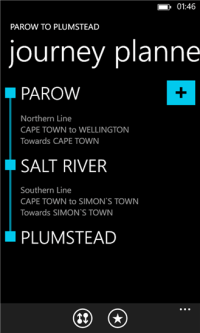
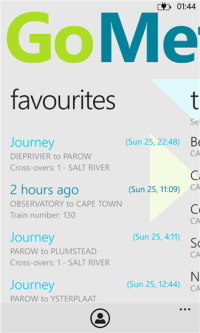
GoMetro is an app designed for your travel needs. It brings together announcements, timetables, maps and more. Also it provides an easy-to-use journey planner that will give you more flexibility when commuting.

Main Screen Results Screen

New Features

  • Metrorail timetables
  • Favourites
  • Fare calculator
  • Railway line maps
  • Announcements
  • OS theme aware
  • Fast and easy-to-use

Privacy Policy

The GoMetro app takes your privacy very seriously and does not, in any way, share, store information about your phone or identity number.

Department of Home Affairs App

App Icon

Ever wanted to see the progress of your South African ID or Passport application? Have you ever wanted to check to see if someone is married, or if someone is still alive? This app allows you to discover public information on South African residents.

I created this app to have a nice, quick and easy way to check my status of my application for my passport.

Main Screen Results Screen

How To Use

This app is very simple and only has one step: enter your ID number and press “check status now”.

The results that are put together and displayed include:

  • ID application progress
  • Passport application progress
  • Marital status
  • Alive or deceased
  • Duplicate ID status
  • Permit application progress

Privacy Policy

The Department of Home Affairs app takes your privacy very seriously and does not, in any way, share, store information about your phone or identity number.

My Personal Data

None of your details are stored or shared on any server, anywhere except for:

  • Anonymous approximate age for in-app analytics and cannot be used to associate anything to you.
    This is purely for statistics and is only used for determining the average age groups of the app’s users.
  • Anonymous gender for in-app analytics and cannot be used to associate anything to you.
    This is purely for statistics and is only used for determining the average gender of the app’s users.
  • Anonymous approximate location for in-app analytics and cannot be used to associate anything to you.
    This is purely for statistics and is only used for determining the average (general country/state area, nearest to a city) location of the app’s users.

My Phone Data

App doesn’t access to sms history, browsing history or other data from your phone other than a general location, see above, used specifically for anonymous statistics.

Permissions

  • Geolocation Data – All information is totally anonymous and only used for app usage statistics
  • Networking – Only used to retrieve the results of your search and to send anonymous app usage statistics

Department of Home Affairs Data Servers

All information used by the app are all available on the official website of the Department of Home Affairs for the Republic of South Africa.

The same results generated by the app can be retrieved on the official status page: http://www.dha.gov.za/status/.

For Windows Phone, By Surface Pro

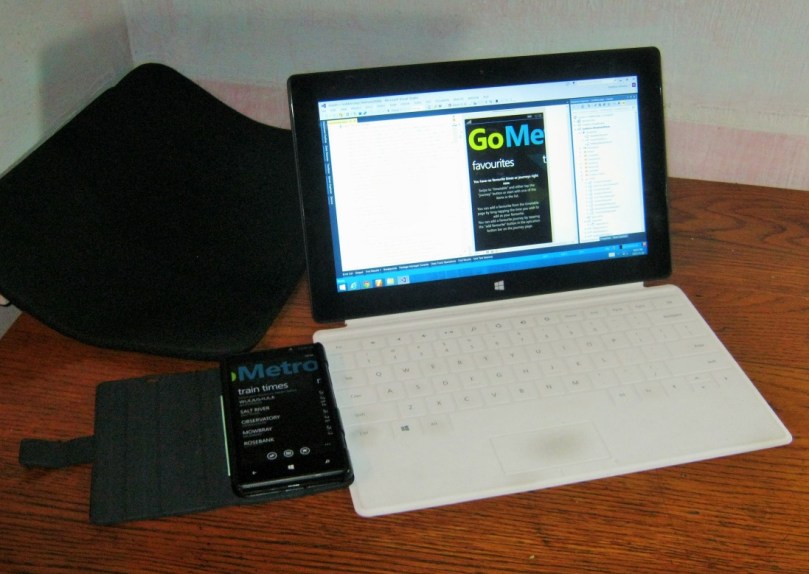
Surface Pro and Windows Phone

I was just reading through my usual news feeds, one of them being Windows Phone Central when I came across a cool post from Microsoft, “Geek out with Surface and win!“. So I started thinking about what I could do. I am one of the very few people in South Africa that has a Surface. The shipping is what kills, but I had to get one. I am also a developer, so it seemed natural to get a tablet that ran Visual Studio. Only the tablets running Windows 8 Pro was of any real value, so after a bit of thought, I got myself a Surface Pro – and have been loving it ever since.

Just to show how great this tablet really is, I can say that I gave my PC away and never once regretted that decision. I have developed an app for Windows Phone 8 exclusively on the Surface. It is available on the Store: GoMetro | Windows Phone Apps+Games Store. I am proud of this app as it is my first for Windows Phone as well as it being developed on my favourite device – my Surface.

Some time ago, before I started the app, I wrote a post on what I was going to do: “GoMetro for Windows Phone 8

I love my phone and my tablet, and I develop apps for both. I am working on several projects ranging from websites, Windows Phone and desktop. C# is my main language, but I do do extensive JavaScript and CSS development for those wbsites.

As you can see, my Shift and Ctrl keys are a bit worn from my continuous use! I won’t recommend the touch cover for extensive use, certainly not for development, but it can be done – you just hve to get used to typing.

Overall the tablet is very good, it can play the average game as well without a real problem. Excellent for surfing the web and social networking, emails and other light use. I read my digital comics on this device and they are clear, crisp and vivid.

On more serious tasks, it is also oustanding, development is slightly harder due to the small screen, but I developed an app without any external monitors so it can be done. I have done some photo editing and 2D drawings without any problems. I run a virtual machine using Hyper-V for one of my projects, and have not noticed a real problem.

The OS is snappy an the apps that I use are very good: Mail, People, Facebook, Internet Explorer, Skype, Nokia Music, Adera (game), Fresh Paint and Autodesk Sketchbook. There have been some tremendous improvements since Windows 8.1.

The USB port in the charger is used to charge my phone and the stylus is used for my assignments and note taking in both OneNote and Word. I have done some nice drawings and the stylus is pretty accurate. The USB port is used mainly to connect my external HDD, but is used for other things, even for emergency charging of my phone when I don’t have my charger around.

The sound quality is good, sometimes a bit soft, but that doesn’t really affect me as I use it mostly after hours and late into the night. Movies are awesome, colours are good and there is no lag in the images that I can see.

I find the battery life is fairly substantial, setting my brightness to about 75% usually extends it for several hours – I have never actually measured, but it is more than 5 hours. Often, in my bed at night I can read my comics, setting the brightness right dow and it’ll last for hours even from below 50%.

One more thing, SkyDrive. This is integrated into the OS, but that is just cool. The most totally awesome feature is the photo file management: I have got over 8GB on SkyDrive, but it only takes up 170MB on disk. This is the greatest and coolest of all those cloud guys. Especially as the tablet has limited storage of 128GB. I have just clocked at 50% on my HDD, so the space is not being swamped, even with Office, Visual Studio and its SDKs. Although, I do have an external drive for my music, movies and other large games such as Battlefield.

I look forward to trying and maybe buying the Surface Pro 2…

GoMetro for Windows Phone 8

I was just recently given the opportunity to work on a Windows Phone 8 app for the GoMetro system. Currently they have the mobile website and are working on a new-and-improved version, but not yet a Windows Phone 8 native app. As I have a shiny new Nokia Lumia 820, its no good going to the web browser each time I need to take a train.

They have a REST API that I will be using, but I hope to use some caching and personalization on the user’s device. The next version of the GoMetro engine will have more features like these, but until then, it will have to remain local only. Of course, once the next version is out, I should just be able to import them into the online database.

I have been working on some concept designs for this app, which I show below. I am using ProtoShare instead of manually drawing each screen. This is a cool tool for quick screen creation, although it is not free. I will give it a try and see what happens.

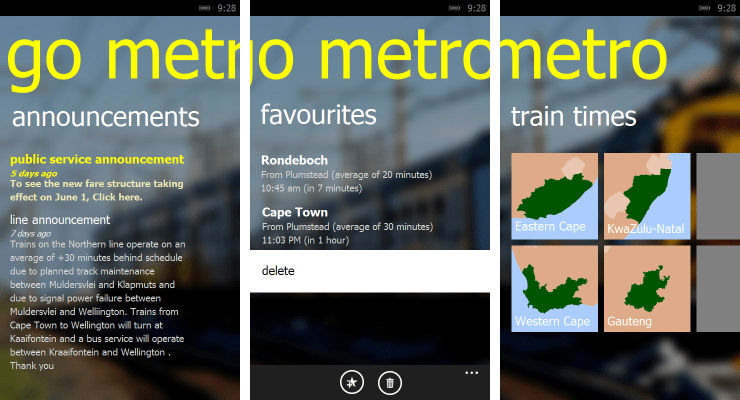
This application so far has 3 main areas of importance:

  1. Announcements
    This is the area where we will be able to display any notifications about the lines, Metrorail and the app.
  2. Favourites / Shortcuts
    This is probably the most important feature for me as I often don’t commute to work on a specific train, but rather the one around 8:30, sometimes before and sometime after. So instead of going through the whole workflow to get the next time, I can quickly see the scheduled arrival. As the current API does not support storing this on the cloud, I will keep it in a small SQLite DB on the actual device, to be synced at a later date.
  3. Train Timetables
    This is the usual workflow for getting the times of the next train. The next image follows on from after the user selects a province that he/she is interested in.

Main Screen 

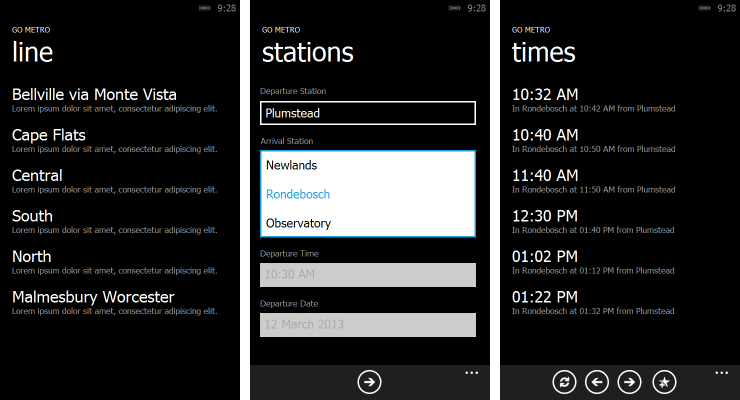
The next main chunk of application is the actual finding of the train timetable. This is going to be the same as the website in structure.

We get to this level after the user selects a province from the main screen. He/she then selects a line and then proceeds to select the departure and arrival stations. I would like to be able to specify the day and time of the trip as well, but I need to do some more research on the availability of this first. When the user is ready, all is needed is to tap the arrow button. The final screen is a list of the departure times with a few options:

  • Switch the direction of travel
  • Go to the earlier times
  • Go to the next set of times
  • Add this route to favourites

Timetable Workflow

This is just the preliminary designs and probably will change. If you have any comments, then just leave a comments below. Or you can vote.

My Microsoft Surface Pro

Earlier this week my new Surface arrived! It is very, very cool and I haven’t stopped using it since it arrived.

Being the Pro one, I installed Visual Studio 2012 already :). At work I did use it a bit, but I have not done any dev yet as I don’t have bluetooth keyboard yet.

The shipping costs where quite high due to me having to import it. I used Amazon, but had to use a Third Party vendor, WorldWide Distributors, as Amazon does not stock the tablet. (the total costs worked out to 2/3 tablet and 1/3 shipping and admin fees) I really feel that the cost was worth it. I can use it as my “normal” desktop as will as a tablet. I an not really a gamer, so the lack of a dedicated graphics card does not really affect me. I also think that the USB port on the side was a good move by Microsoft as I can now plug in my flash drive and/or external hard drive.

I am currently looking into a portable hard drive and a cable for my monitor (as the device has a mini DisplayPort and I have an old DVI monitor). I will probably buy a cheap bluetooth keyboard and mouse until I get one of the Touch/Type Covers (I am actually writing this with that pen).

I have an album on Facebook with some photos of my surface. Yay!

Well anyway, this is just an update, I still want to do some more blogging this months.

I am a contributor to Mono

I just remembered that I had previously made a pull request in the Mono project, and when I went to have a look today, I saw that it was accepted! Yay! Now I can say I have contributed to the coolest project in the world. I don’t know if those two lines really count, but at least I am part of the Mono team (at least I like to think so).

I suppose this is a way to realise that no matter how small a contribution to a project, endevour or anything, a contribution is really helping others. Maybe I will contribute some more in future, but at least now I will have that one line moved for the better.

I came accross this when I was creating my port for the Windows Phone / Silverlight.

New Domain Name for my Site

It’s all so exciting when one gets a new place to stay, or move to a new house, that’s why when I finally got my domain registered, my face is all lit up. I am not a super-blogger like some other great devs out there, but that is no reason why I shouldn’t be happy about getting my own little bit of space in the fluffy clouds of the Internet. My new domain is, if you are not already there: http://dotnetdevddict.co.za. Yes, it is a tad bit too long and not a very good one, but until I can think of a better one, it will have to do.

I am busy re-working my Mono.Data.Sqlite.Orm library for an app that I will be writing: a comic-book reader. I recently started reading comics again – I especially liked the older Batgirls (2000 – 2006 editions). After signing up with Comixology, I found that it is a good way to kill time when commuting to work. I decided that I needed a read for the train, and being the techy guy that I am, I decided to read electronic comics. Thus, this inspired me to create an app that will allow me to read my comics as well as any ones that I scan in, or get from other sites, on my way to work.

Not to be all about comics, I also did some reading on some very cool programming languages. Or should I say strange ones? My favourite so far is LOLCODE. What is LOLCODE? Check out this simple “Hello World!” app:

HAI
CAN HAS STDIO?
VISIBLE "Hello World!"
KTHXBYE

Check out CodeSchool’s online LOLCODE tutorials. Here is a more complex example:

HAI

  I HAS A ANIMAL
  GIMMEH ANIMAL

  BOTH SAEM ANIMAL AN "CAT", O RLY?
    YA RLY
      VISIBLE "U HAS A KITTEH"
    NO WAI
      VISIBLE "KITTEH R 2 GUD 4 U"
  OIC

KTHXBYE

I’ll explain what is happening line-by-line:

Start the app
-- Declare a variable "ANIMAL"
-- Request a value from the user and store it in "ANIMAL"
-- Compare equality of the variable "ANIMAL" with the literal "CAT"
-- Evaluates to True
-- -- Write to the screen
-- Evaluates to False
-- -- Write to the screen
-- Close the comparison block
End the app

What more can you want? It supports variables, functions, loops and even plugins! I am going to create a little app – probably clone one of my QBasic ones from the early days (These apps are actually ports from the old, old ZX Spectrum programs :D). One of the reasons I like this one is that it an compile to IL! Who says programming is boring?

Making the Wijmo Drop Down Listen

Wijmo is a awesome HTML/JavaScript toolkit that provides styled widgets for any website or web application. They provide great integration with the equally brilliant KnockoutJs.

I was using the Wijmo drop down control, but I found that there was something a bit strange: the control does not update it’s value when the observable changes its value. The control is actually a very thin wrapper for Knockout’s default binding for the <select> element. Knockout listens to the element’s updates and can update the element from the observable, but Wijmo does neither: it only can update the HTML that control is bound to. Thus, the value on the control is never updated at all; the observable’s value is updated because the widget updates the HTML and then Knockout updates the observable as it listens to the HTML.

This posed a problem as I would have to manually listen to the observable and then update the widget, this is boring and I should not have to do it. So I wrote a wrapper for it and extended the wijdropdown binding:

(function () {
    // override the wijdropdown to update the drop down display label when the selection changes
    var proxied = ko.bindingHandlers.wijdropdown.init;
    ko.bindingHandlers.wijdropdown.init = 
        function (element, valueAccessor, allBindingsAccessor, viewModel, bindingContext) {

        var options = allBindingsAccessor();
        var value = options.value;

        // subscribe to the changes and update
        if (ko.isObservable(value)) {
            value.subscribe(function () {
                $(element).wijdropdown("refresh");
            });
        }

        // continue as normal
        return proxied.apply(this, arguments);
    };
})();

The original code would have required me to listen to each observable with this code:

myObservable.subscribe(function () {
    $("#selectElement").wijdropdown("refresh");
});

But the extension does away with this and I can simply bind to the element:

<select data-bind="value: pageSize, wijdropdown: {}">

The reason that there is a “double” binding is that the default Knockout binding is sufficient to work the drop down, and the wijdropdown just adds the styling.

Changing Bing Stylesheets

I have never liked Bing’s results page style, it is a decided lack of coloring – or anything for that matter. So, using Google Chrome I tweaked the stylesheet.

Here is the before:


Here is the after:


And all it took was a little CSS:

#sw_hdr {
    border-bottom: #6190FF 1px solid;
    padding-bottom: 12px;
    background: #DBE6FF;
}
#id_h {
    height: 75px;
    background: #DBE6FF;
}
.sw_bd {
    background: #FFF;
}
.sb_form_go {
    background: #DBE6FF;
    height: 25px;
}
.sb_ph .sb_count {
    color: #777;
}
.sw_logo {
    background-image: url('http://www.logostage.com/logos/bing.png');
    background-color: #DBE6FF;
    background-size: 75px 26px;
}

It is just a tiny splash of colour and everything looks better. I use the different image because I wanted the transparency. Maybe Microsoft will change it a bit and then we can all celebrate by doing a few extra searches – maybe even click on some ads?