JavaScript Ajax & ASP.NET WebAPI

Recently I was working on a HTML/JavaScript web application and I was having one of those moments where everything was working fine except for one small thing: the server always seemed to receive NULL.

I tried the usual check-for-null-before-sending, but this was not the problem. Maybe it was breaking in the jQuery Ajax call? Is that even possible? 🙂 Everything was perfect, including when checking the request data with Internet Explorer’s Network Traffic Capturing Developer Tool. It was sending the data across. The JSON was valid and everything.

I decided it was the server. It was a basic ASP.NET WebAPI. All the GETs were working so why was the POST failing? I checked the ApiController’s http context request content. That was correct. The only thing that was wrong was the method’s object parameter value being NULL.

So what was it? The client was sending the right data and the server was receiving it, but the object was NULL.

Here is the JavaScript code:

$.ajax({
    url: '/api/ingredient',
    type: 'POST',
    data: JSON.stringify(ingredient),
    contentType: 'json',
    success: function() { ... },
    error: function() { ... }
});

That was perfect. Now on the server:

public class IngredientController : ApiController
{
    public void Post(IngredientDto ingredient)
    {
        // it failed here as "ingredient" was NULL
    }
}

After searching for some time and trying all sorts of things, I finally found where I went wrong. Now, we all know Microsoft for not being very standards compliant, I mean look at Internet Explorer before version 9, it was pretty glum times. But the problem lay with Microsoft being too standards compliant. The problem lay in the small string, “json”: it is not the right string. Of course if this was a strongly typed language, an enum based action, this would have never have happened. (Look out for my upcoming post on Type Safety)

The informal standard according to Internet Assigned Numbers Authority‘s (IANA) media types and The Internet Engineering Task Force‘s (IETF) RFC4627:

The official MIME type for JSON text is “application/json”.

Wow. What a waste of time. And of course, as soon as I changed the Ajax type from “json” to “application/json” everything JustWorked™.
So the new code is:

$.ajax({
    url: '/api/ingredient',
    type: 'POST',
    data: JSON.stringify(ingredient),
    contentType: 'application/json',
    success: function() { ... },
    error: function() { ... }
});

I hope this helps someone to avoid what I was doing: wasting time. But I did learn a few other things along the way, all was not lost.

Pre-Loading Silverlight Prism Modules & Assemblies

I was developing a Unity/Prism Silverlight enterprise application which used many shared assemblies and several modules. I wanted to show a ‘startup progress’ for the core assemblies so the application would have a better user experience, especially for the users’ first few moments of the application.

Problem

The Silverlight plugin downloader only reported the progress for the shell. User experience was very poor due to the lack of a real gauge of the total progress. Even though the entire application was about 7 MB, the shell was only 500 KB. This resulted in the built-in progress bar reaching 100% very quickly, way before the actual download had reached 10%. This was not really a problem on faster connections, but on slower connections, there was a long delay before the application really started. This delay exists because the shell is finished downloading, but Silverlight is still downloading all the other assemblies and modules. These other assemblies make up the main part of the application, and thus is more important compared to the shell.

So what I wanted to do was to find some way to hook into the actual Silverlight download requests of all the files and then use this instead of the built-in progress reporting. However there doesn’t seem to be any way to do this from JavaScript.

Solution

I know that almost all browsers support caching and subsequent loads from the cache are almost instantaneous. I can use this to my advantage. So what I did was to pre-download the files that would have been downloaded if I was using the built-in downloader. Then, when the Silverlight control started its own download, all the required files would be in the browser cache. This allows the application to no longer need to download the files, and the application startup would be very quick, thus not needing a Silverlight progress section here.

Implementation

This solution calls for several things:

  • I don’t want any hardcoded values, such as sizes, filenames or urls.
  • The splash screen should be seamless with the actual Silverlight application
  • JavaScript downloader should start and then switch to the Silverlight control once it is finished.

The first thing that I needed to do on the server was to create a way for my JavaScript code to get a list of all the files and their sizes that it needed to download. Just to keep things simple, I created a simple ASP.NET Generic Handler that returned a JSON string of all the files. Because Silverlight downloads the files in our “ClientBin” folder, my handler simply enumerates the files in this directory and returns this. I also didn’t want to build up this resulting string manually, so I used a DataContractJsonSerializer that serializes the array of files – I created the returning types as internal classes of the handler.

On the client, I can request the list then calculate the total size for the progress and start downloading. As each file finishes downloading, I can update the progress message and it will be more accurate to what is really happening.

The splash screen is a very simple HTML div that is displayed over the actual Silverlight object. The Silverlight object is actually hidden by default using CSS styles, to prevent it from automatically starting up. When my JavaScript reports that all the files are downloaded, I hide the splash screen div and show the Silverlight control. This provides a very accurate, user-friendly way of reporting progress. And when the download reaches 100%, all the required files are all finished and on the client.

Notes / Observations

I did have a problem when I pre-downloaded the shell xap file: Silverlight did not start the actual application. So to work around this I decided to downloadd all the files, except the shell and let Silverlight do this one. Now this caused slight problems in my download mechanism: First the progress would be off slightly and I would have no way of reporting this shell progress. Silverlight has JavaScript callbacks for the shell downloads: the onSourceDownloadProgressChanged function.

Because I know the size of the shell – from my handler, and I would have notifications from Silverlight about this file’s progress, I could then combine this with my progress message to get a nice value. So effectively, my download stops at 90% and then the Silverlight control will take over and notify me of the shell’s progress which I work out how far it should really be.

Currently I am using both the HTML element and the Silverlight mechanism for splash screens. For the first bit, I use the HTML element and when the Silverlight takes over, I hide it and the Silverlight (xaml) version shows. Both are exactly the same so the user does not notice the switch at all.

Code

This is the server-side handler. The Browser Cache mechanism for the urls are case sensitive, so remember to use the case that Silverlight is going to use for it’s requests.

public class BrandDirectorFilesHandler : IHttpHandler
{
    public void ProcessRequest(HttpContext context)
    {
        context.Response.ContentType = "text/plain";


        var serializer = new DataContractJsonSerializer(
            typeof(DownloadableFileResponse));
        serializer.WriteObject(
            context.Response.OutputStream, 
            GetFilesInRoot());
    }

    private static DownloadableFileResponse GetFilesRoot()
    {
        // logic to read the file list from the file system
    }
}

Here is the resulting objects that I serialize for the client.

[DataContract]
internal class DownloadableFileResponse
{
    [DataMember]
    internal IList<DownloadableFile> Files { get; set; }

    [DataMember]
    internal long TotalSize { get; set; }
}

[DataContract]
internal class DownloadableFile
{
    [DataMember]
    internal string Url { get; set; }

    [DataMember]
    internal long Size { get; set; }
}

This is the part of the whole system that controls the downloads of the files from the client side.

var totalSize = 0;
var progress = 0;
var xapFile = null;

// Silverlight default functions
function onSourceDownloadProgressChanged(sender, eventArgs) {
    if (xapFile === null) {
        // there may have been a problem obtaing the file list
        // so create a dummy state for the silverlight to take 
        // over from - these values are just the last known 
        // values from a previous run that I did
        totalSize = 7000000;
        progress = totalSize * 0.88;
        xapFile = {
            Size: 700000
        };
    }

    var shellProgress = progress + (eventArgs.progress * xapFile.Size);
    var shellPercent = shellProgress / totalSize;
    var text = Math.round(shellPercent * 100).toString();

    // this bit is for the actual Silverlight splash.xaml
    sender.findName("ProgressText").Text = text;
    // this is the html element
    $("#ProgressText").text(text);
    // I do both just to be sure
}

// the javascript for pre-caching the assemblies
$(function () {
    // get this apps root
    var urlParts = location.href.split('?');
    var mainUrl = urlParts[0];
    mainUrl = mainUrl.substring(0, mainUrl.lastIndexOf('/'));

    // download the list of files from the handler
    $.ajax({
        url: mainUrl + '/BrandDirectorFilesHandler.ashx',
        success: function (data) {
            var response = $.parseJSON(data);

            // set the total size for the silverlight bit
            totalSize = response.TotalSize;

            // don't download the shell xap file
            // get the xap filename from the Silverlight DOM element
            var shellXapPath =  
                $("#silverlightControl")
                .children()
                .filter(function (index, child) {
                    return child.name === "source"; 
                })[0].value;
            // find the shel in the list from our server
            xapFile =
                response.Files
                .filter(function (item) {
                    return shellXapPath.indexOf(item.Url) !== -1;
                })[0];

            // start downloads
            $(response.Files).each(downloadFile);
        },
        error: function () {
            // default to silverlight on any errors getting the list
            onAllDownloadsComplete();
        }
    });
});

// all downloads are complete, show the silverlight control
function onAllDownloadsComplete() {
    $("#silverlightControlHost").show();
    $("#htmlLoading").hide();
};

// initiate the download for each file
function downloadFile(index, file) {
    if (file !== xapFile) {
        $.ajax({
            url: new String(file.Url).toString(),
            complete: function () {
                // download of the file complete we can ignore 
                // errors, as Silverlight can deal with it
                progress += file.Size;
                var progress = Math.round(progress * 100 / totalSize);
                $("#ProgressText").text(progress.toString());

                if (progress >= totalSize - xapFile.Size) {
                    onAllDownloadsComplete();
                }
            }
        });
    }
}

Systems & Validation

At Jam Warehouse we had an interesting problem: Data Validation. This in itself is not all that interesting, but if you think about it, what does this really mean? According to Wikipedia:

data validation is the process of ensuring that a program operates on clean, correct and useful data…
And in the case of BrandDirector, not only do we prevent the user from saving invalid data in the database, but also ensure that we don’t do any processing with invalid data.

Ah, now we know what to do! Just put lots of checks in the system. Checks like:

  • ‘if number > 100 or < 0, then show an error'
  • 'if text is not an email address, then show an error'

But, what if the business model consists of hundreds of objects? This is going to get very cluttered and very difficult to maintain. So obviously we need some sort of structure in our code that allows us to create our models without clogging up the code files with numerous bits of check logic.

But before we start to create that awesome code, we need to know what we are working with: BrandDirector is a large client-server system with many domain objects. This is a web based system that effectively allows many users to input data and then it gets saved onto the server. (This is of course a gross understatement of what BrandDirector actually does, but that is not the problem.) I am needing to ensure that the data from the user, before processing and/or saving, is both correct and clean.

Data validation, from a user's perspective, ensures that any data/information from the system is both reliable and useful for business. But, I am not a user, I am going to do the implementing. What I need to do is provide myself a way of adding validation to all those objects without messing up my immaculate code (at least that's what I think). Obviously, we want to tell the user when the data is invalid and instruct him on how to correct it. So, what we are working to provide is: clean code, clean data and error messages.

What we want

Now, we are a C# shop and we like to use all those great features of the C# language, such as attributes and auto-properties. For those that aren't C# fans like me, here is a sample of what I want to write:

// Model
public class Ingredient
{
    [MaximumLength(50)] // <- attribute validation rule
    public string Name { get; set; } // <- auto property
}

This is what I would have written for each model property, if it hadn't been for the frameworks as we will see soon:

// Model
public class Ingredient
{
    private string name;
    public string Name
    {
        get { return name; }
        set
        {
            name = value;
            if (name.Length > 50)
                AddError("Name", "Name must be less than 50 chars");
        }
    }
}

As you can see, It is way more code and just ugly. The first version is both neat and does almost exactly the same thing. It allows the user to set the value and then the UI will display the error message if need be. I say 'almost' because the first does no checking (at least not yet). How are we going to get that checking into the first class? Well, we can use some great frameworks out there that does not need us to change our code at all, but does the checking.

Solving the problem

The two frameworks that are needed are FluentValidation and PostSharp. FluentValidation is a framework that allows us to create rules for a particular type of object and then provides a means to validate an object on those rules. This means is called a 'Validator':

// IngredientValidator validates an object of type 'Ingredient'
public class IngredientValidator : AbstractValidator<Ingredient>
{
    public IngredientValidator()
    {
        // The neatly allows us to create a rule for 'Name'.
        RuleFor(x => x.Name).MaximumLength(50);
    }
}

Using the validator allows us to write a very neat and easy-to-read section of code:

public void SendIngredientToServer(Ingredient myIngredient)
{
    var validator = new IngredientValidator();
    var result = validator.Validate(myIngredient);

    if (result.IsValid)
        SendIngredient(myIngredient);
    else
        ShowErrorMessages(result.Errors);
}

But I don't want to have to do even this small check every time I press the save button. I want the check to run every time I change the properties as well as when I press save. And what I really want is that save button to be disabled when the data is invalid. This is where PostSharp is a really useful. It allows us to modify the compiled assembly and then insert all the checks for us on each property. (We create 'Aspects' that allows us to write the boilerplate code that is applied to each property) This will cause the validator to be run every time the properties' value changes. Now all we have to do is this:

public void SendIngredientToServer(Ingredient myIngredient)
{
    SendIngredient(myIngredient);
}

I can do this with confidence, knowing that my UI will never allow invalid data to ever reach the saving part. All the save buttons will be disabled and error messages will be alongside all the invalid data controls. And, if somehow we manage to get invalid data into the actual save action, the server will also do the validation before doing the actual save to the database. But more of the server later.

On the client

PostSharp will modify all my auto-properties and add the necessary checks into the setters. If any errors are found, the UI is informed. The UI will then respond and show the error messages and disable the save button. But, even in all of this, I still have to write the validators and this requires work for maintaining two separate pieces of logic. All my related things must be in one file. What we currently have is the Ingredient class and the IngredientValidator. PostSharp does the work of adding the checks and the UI does the messages, but still I need to manually create the validators.

Now, this is what I was really working on: The part that generates the validators. One attribute is far shorter than writing a rule. Using this reasoning, I then apply all the combinations of attributes to the appropriate properties. A T4 Template is now used to read the attributes off each model, or in this case the DTO, and then generate the equivalent Validator.

So I have 3 things now:

  1. The Model/DTO that I write with my properties and their attributes
  2. The Validators that is generated from reading the Model attributes
  3. The PostSharped assembly with the injected validation checks

This is all very exciting, as I only have written the one part, the Model. And then all the bits and pieces are put together to create the equivalent of the big and ugly piece of code; one property and one attribute produces almost everything (at least on the client) I need.

The server

Now, as with all client-server systems, data goes across the wire. It first gets downloaded for the user to edit and then the changes are uploaded to the server. It is useless to put the error messages on the server as the user will never see them, and it is unwise to put the validation on the client as can be seen by the fact that we have pirate software. Never trust the user. We can reach the conclusion that we need validation on the client, for those error messages, and also on the server, just to make sure that the data is in fact valid.

This now brings in a problem of duplication. The models on the client are DTOs that are a small subset of the domain model. They have the same need of validation as they are used by the UI. As the DTOs on the client are not the same as the models on the server, we can't reuse the code. we are going to have to re-write it in the way that the client part needs it to be. One of the ways that I chose to solve this problem is by copying the rules. We can do the traditional way of copy-and-paste, but that is practically asking for disaster. Developers will, at some point in time, forget to update either the Model or the DTO. Or something else even worse will happen, such as only adding validation to the client and not the server. This is where the T4 Template is very helpful. It can read the validation off one model and merge them with the ones on on the model that we are actually creating the validator for.

For example, we have:

  • one Model, say Ingredient, and
  • two DTOs, IngredientNameDto and IngredientSupplierDto.
  • The Ingredient Model has, among others, two properties: Name and SupplierName.
  • And the Dtos have a property Name and SupplierName respectively.

We want to add the validation to only one model, Ingredient, and then have the validators generated for all three objects. The way I achieved this was to add a single attribute to the DTOs that specified which type of Model to get the validation rules from, in this case Ingredient. Using this way of providing validation almost does everything for us. And just to show what we do in code (a super simplified model):

// Domain Model on the server
public class Ingredient
{
    [MaximumLength(100)]
    public string Name { get; set; }

    [MaximumLength(50)]
    public string SupplierName { get; set; }

    // other properties here ...
} 

// shared across the client and server
[CopyValidation("BrandDirector.Models.Ingredient")]
public class IngredientNameDto
{
    public string Name { get; set; }

    // other properties here ...
}

[CopyValidation("BrandDirector.Models.Ingredient")]
public class IngredientSupplierDto
{
    public string SupplierName { get; set; }

    // other properties here ...
}

What I haven't said yet, is that the Validators are in a different assembly to the Models. This is because the T4 Template reads the compiled assembly in order to generate the Validators. So the order of actions is really: write model, compile model, generate validators. As you can probably see, the model is compiled before the validators are actually created, so we can't reference the validators directly from the model. What we have is a Registry of all the validators available to the client or server. Therefore, we register the validator assembly when the app starts up and then find the validator when we need it. Here is an example of what the PostSharp does for us:

// Model
public class Ingredient
{
    private string name;
    public string Name
    {
        get { return name; }
        set
        {
            name = value;
            var validators = ValidatorRegistry.FindValidatorsFor<Ingredient>();
            var results = validators.SelectMany(v => v.Validate(this));
            // Do what needs to be done with the result
        }
    }
}

Depending on whether it is on the server or the client, the appropriate action is taken. If it is on the server, we throw an exception if the results are invalid. This is to totally prevent any invalid data from actually reaching the model itself. The exception is then sent back to the client and then handled there; all processing on the server now stops. On the client, we just add an error message to the list of errors that is displayed onscreen. Because the app itself and the server knows where the validators are, we can register them when the server or app starts:

public void OnAppStartup()
{
    ValidatorRegistry.RegisterValidators(typeof(Ingredient).Assembly);
}

So, by utilizing existing frameworks, we can reduce the amount of code that we as developers write. This enables the developers to spend more time writing the really cool bits of code and not repetitively doing the same thing.

Trying to Blog… and an update

It has been a very long time since I started (or attempted to start) blogging. I hope to really get down to doing this again. What might help is the fact that my company is re-working their website and is asking the developers to start posting an article every couple of months.

Anyway, I have been very busy with my studies, work and other small projects on my GitHub account (github.com/mattleibow). I have several repos, but my cooler ones are the Mono.Data.Sqlite.Orm and the Android.Play.ExpansionLibrary.
The Mono.Data.Sqlite.Orm repo is a small and light-weight O/RM for the Sqlite library on the various platforms.

The initial idea was from Frank A. Krueger and his sqlite-net, but I re-wrote almost the entire library using the Mono.Data.Sqlite assembly instead of his custom types. I also had to port the Mono.Data.Sqlite assembly from the Mono repository to use the C#-SQLite library instead of the sqlite.dll native library.

I also want to create some more docs for this library, so I just set up the GitHub Pages for this repo: http://mattleibow.github.com/Mono.Data.Sqlite.Orm. I will see if I can use this.

The Android.Play.ExpansionLibrary repo is the C# equivalent of the Google provided Java LVL and Expansion libraries. This was, and is to an extent, still an almost a direct translation from Java to C#, but I think it has a few improvements. Such as, a nicer storage system.

I also got my first Android App onto Google Play:
https://play.google.com/store/apps/details?id=com.jamwarehouse.apps.puppy.trial!
This was very exciting and I am very glad that I got this opportunity.

Now I am going to try and edit that GitHub Pages for my repo… But before that, I am going to add some images so that when I select the other layouts, I will get a picture 🙂

Cross-Platform Mobile Apps

One of my current projects at Jam Warehouse is to port the app, You & Your Puppy, from the iPhone/iPad to the Android devices (Smart-phones/Tablets). Over the month of November, I have completed the first version and is now undergoing review at our client, DogsTrust.

The App

It is my first ever Android app as well as my first ever mobile application. The current version that is being tested is written in Java. It is also my first Java application as well. (Lots of firsts 🙂 I then re-created the app using MonoDroid using C# – this is still only been tested in the emulator as I haven’t bought the MonoDroid licence yet. I am currently porting the app to the Windows Phone as well. I opted to use the MonoDroid/MonoTouch instead of native languages for several reasons:

  • I am a total .NET addict – as you can see by the title of this blog 🙂
  • Code re-usability – Write once, test once, deploy n times, get n money!
  • Automatic memory management – who wants to dispose objects manually anyway?
  • Make use of advanced C# features and short-cuts – I can churn out some serious code…
  • And who wants to learn Objective-C or use Eclipse – C# and Visual Studio for me!

The Code

Code re-usability is really cool if you are having to write apps for 4 or more different platforms:
  1. Java for Android
  2. Objective-C for iPhone
  3. C# for Windows Phone
  4. Java for Blackberry
  5. HTML 5 for everything else
We could just use PhoneGap or something similar for all the devices, but why make it too easy? Lets go native! C# for Android/iPhone/Windows Phone and HTML5 for all the other players in the game 🙂
We all know (or at least I hope we do) that the iPhone has a “slightly” different layout to the Android phone. So, how do I get this “write once” thing in the list? Well, I didn’t tell the whole story as you can’t really 🙂

The Database

I do have an element of “write once”, but not for the entire app, just the non-visual part. As all the versions are going to be reading from a database and showing images/videos, we can use the same code for this part.
But there’s a catch, as always, what database do we use? We can use xml files for the data, but who wants to? We are advanced guys here, we use a database when a database is “needed”, just now we have to expand this app. As the original database was a SQLite one, so I used that. No complaints there as it is one of the best (if not the best) for mobile development. But now there’s another catch – this time with Microsoft: Windows Phones don’t have SQLite. And you can’t put the C++ version on the device either. So what do we do? Do we use a different database especially for this? No! we use the C# version called System.Data.Sqlite – much easier than maintaining two databases 🙂 – Don’t we all love this thing called C#?

The Data

OK, so we have the database. Now we need to read this data. We can of course write SQL queries and use the SqliteCommand classes, but who wants to use strings in a strongly typed language? Not me. After a little bit of research a found SQLite-NET a very small ORM for the iPhone. I was saved from strings! It also works on the Android phones! But maybe you noticed that I didn’t say anything about the Windows Phone, That’s right it doesn’t work! – Yup, Microsoft is making things hard for me, but I will not yield, not even to the global monopolistic software company that churns in the billions hourly! No! I re-write the SQLite-NET library (or just tweak it slightly). SQLite-NET was originally using the [DllImport] attributes (P/Invoke) to gain access to the sqlite3.dll that is stored somewhere on the filing system on each device. But for those who don’t know, no P/Invoke on the Windows Phone.
I converted the ORM to use the native SqliteCommand and SqliteConnection instead of the P/Invokes. I don’t actually know why the guys recreated those two classes when they could have just used them instead. Maybe there’s something I don’t know 🙂 I practically halved the code and reduced the amount of possible bugs.
So, now we are up and running with the database, a strongly typed ORM and I can use LINQ to SQLite as well!

The UI

Now we get to the basic functionality of the app, showing the information to the user! This is where the not-so-well-documented MonoCross library comes into play. (I’m hoping to buy this book Professional Cross-Platform Mobile Development in C# that’s supposed to show me the best way to use the framework). All the navigation between screens is taken care of and all getting the data ready for showing is done. Now, the user wants to click (or touch) on something, that’s why they bought the app in the first place :). Here’s the “snag”. We want cross-platform, but we also want the app to look like it was especially designed for each device – although it wasn’t. So we recreate each GUI screen for each platform, but we don’t use any non-platform specific code and if we have to, we abstract it!
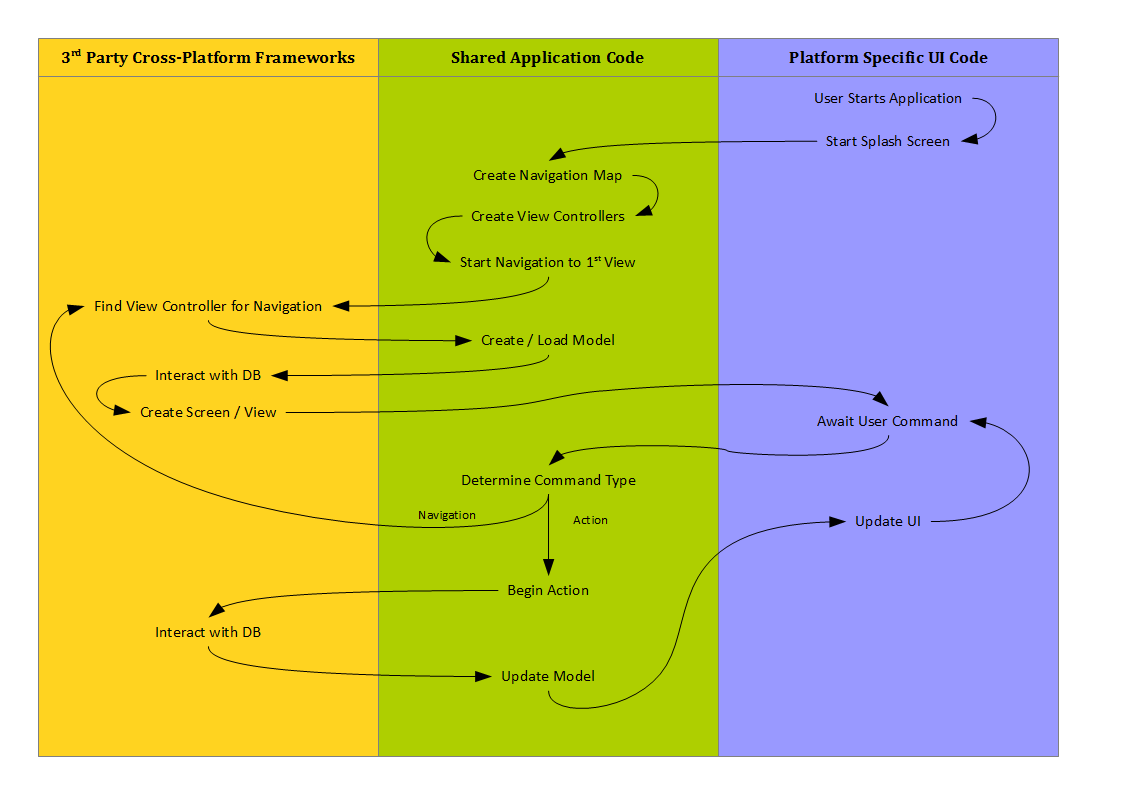
In order to get the UI updates and things to happen, I subscribe to events that are raised on the Model, and then perform the necessary tasks to show each page to the user. I also catch all the events from the UI and perform the respective actions on the Model. For example, when the user clicks a link/button the command is sent to my middle-ground library. This library checks to see if the command is a navigation command. If it is, it then notifies the MonoCross framework that we want to navigate to wherever. If it is an action command, we inform the Model of the action we want to perform. The model is then updated, and the Model then fires an event that the UI will know that it has to change.
When we navigate, each screen has an abstracted helper class that receives the command as a parameter, which is then processed and used to inform the Model of the actions required (if any). When the actions are finished, the new screen is displayed.

The Diagram

Here is a basic diagram of the flow of the app from the time the user presses start and just how little code is actually needed for the platform specific areas.
As this diagram shows, most of the code is re-used.
And to prove it (mostly to myself), I was able to port the basic functionality of the Android version of the app to the Windows Phone in about 2-3 hours. There was almost no need for changes to the shared code. A bit of tweaking did improve it, but all the platforms – and future ones – will benefit.

Transparent WebView on Android Devices

I’m trying to re-write a java android app into Xamarin.Android, however I have come across an issue with the background transparency of the WebView that I use to display the contents of each screen.

This code works correctly on the java version (Black text on a green background), but in the C# version, the WebView’s background is black (black rectangle on the green background).

Java Code:

    @Override public void onCreate(Bundle savedInstanceState) {
        super.onCreate(savedInstanceState);

        LinearLayout layout = new LinearLayout(getApplicationContext());
        layout.setBackgroundColor(Color.GREEN);
        WebView webView = new WebView(getApplicationContext());
        layout.addView(webView);
        setContentView(layout);

        webView.getSettings().setJavaScriptEnabled(true);
        webView.setBackgroundColor(Color.TRANSPARENT);
        String html = "<html><body style='background-color: transparent;'>Some text...</body></html>";
        webView.loadData(html, "text/html", "UTF-8");
    }

C# Code:

    protected override void OnCreate(Bundle bundle)
    {
        base.OnCreate(bundle);

        var layout = new LinearLayout(ApplicationContext);
        layout.SetBackgroundColor(Color.Green);
        var webView = new WebView(ApplicationContext);
        layout.AddView(webView);
        SetContentView(layout);

        webView.Settings.JavaScriptEnabled = true;
        webView.SetBackgroundColor(Android.Graphics.Color.Transparent);
        string html = "<html><body style='background-color: transparent;'>Some text...</body></html>";
        webView.LoadData(html, "text/html", "UTF-8");
    }

There is also a ‘Android.Resource.Color.Transparent’, but don’t use this one as values returned from the Android.Resource namespace are resource ids, not colours.